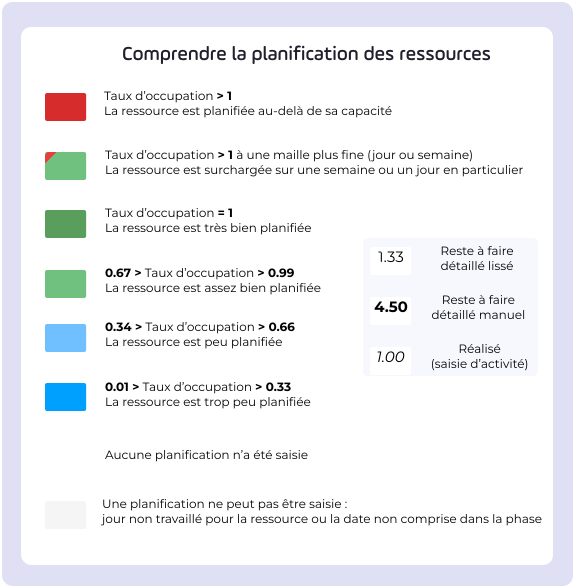
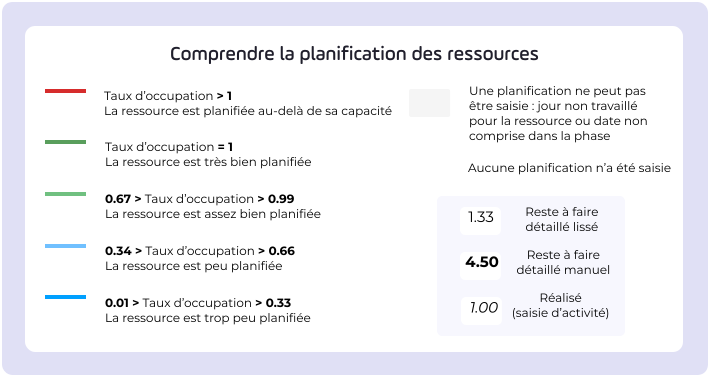
There are two ways of scheduling resources: progressive scheduling and manual scheduling .
Progressive scheduling makes it easy to parameter workloads as the project progresses, thanks to automatic smoothing of the remaining workload.
Manual scheduling allows you to keep control of the data entry process by only scheduling the remaining work manually.
Progressive or manual scheduling can be activated or deactivated in the settings for a particular project, or via the project list (mass update) if several projects are involved.
Resource scheduling in general provides the various parties involved in load scheduling with important information.
The project manager can easily schedule / reschedule their project resources on a daily, weekly or monthly basis.
The resource manager will be able to view/create/correct a team's workload plan
Team members can schedule their own time.
General information
 Representations of the Resources theme
 Resource scheduling rights
 Pink Booklet: Manage your resources with progressive scheduling
For the resource manager
 Use the capacity plan
For the team member
 Enter my detailed scheduling
For the project manager
 Assign a resource
 Set the target load target reassign it
 schedule le remaining work
 Transfer remaining work
 Use the forecast total
 Use manual scheduling mode
 Update scheduling
 Find out if a resource is available or has remaining work
 Linking a resource report to a project
 Filter resources
.svg)