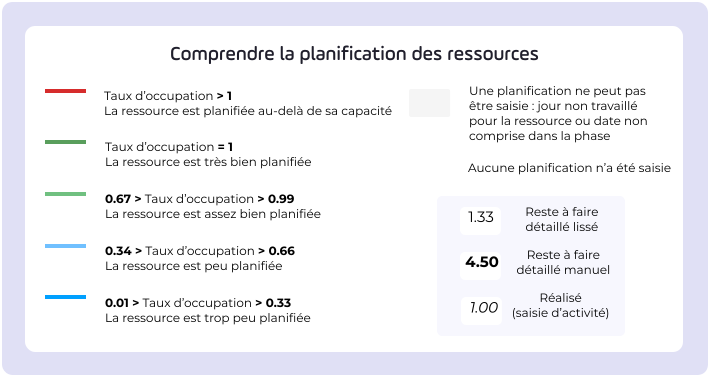
Logo
  • Other versions
  • Virage Group
  • Espace Magenta
  • Support ticket
  • Strat Monitor documentation
Logo

Produced by Virage Group

Project Monitor v7.7 Knowledge Center
/Frequently asked questions
Frequently asked questions

Frequently asked questions

‣
Table of contents
  • General
  • I haven't received the password change email. What can I do?
  • How do I find out what version of @Project Monitor ?
  • Why can't I modify the value of an attribute ?
  • What's the difference between status and status ?
  • Where can cockpits be added?
  • How does my cockpit change color/shape?
  • How do you find out how a right is acquired?
  • Which dashboard is displayed for my user?
  • Project
  • Why can't I enter my project?
  • Why don't I have access to all project templates?
  • What's the difference between applying and inserting a template ?
  • Why can't I delete a project?
  • What actions are possible in the project list?
  • Why can't I see all my projects from the list?
  • Planning
  • What's the difference between planning target and planning estimated ?
  • Why does a link to another project appear at the top of my schedule?
  • Why does my dependency between two objects appear in orange?
  • What does the vertical red line on my schedule represent?
  • Can I display the schedule of children's projects in a parent project?
  • Why can't I delete a phase or milestone ?
  • Automations
  • Can I create a new automation on my platform?
  • Can I benefit from automation on my platform without changing my offer?
  • What happens when I insert a template with automation?
  • What happens when I apply a template with automation?
  • Is it possible to remove automation from a project that has been created with a template containing automation?
  • I've already created projects from templates in which I've set automation parameters. How can I add a new automation to projects I've already created?
  • Can I mass-apply automation to projects other than via project templates?
  • Can I submit a request for automation?
  • How do I know if there's a settings error in my automation?
  • portfolio
  • Why can't I access portfolio reviews?
  • Why can't I add a comment to a slideshow?
  • Why can't I display my gantt chart / load plan in a scenario?
  • Do changes to a scenario have a direct impact on my project data?
  • Resource
  • What's the difference between a resource and a user?
  • What's the difference between a named resource and a generic resource?
  • What is the purpose of a generic resource?
  • How do I add an attribute the resource screens?
  • Entering activities
  • Why can't I see all my assignments in my timesheet ?
  • What do the color codes in my activity report mean?
  • Why can't I view or modify some of my colleagues' entries?
  • Should I enter my activity in hours or days?
  • What are the different statuses?
  • load scheduling
  • What happens if I enter global remaining work on a project for the first time?
  • How are colors updated in scheduling boxes?
  • How do I know whether I have manual or automatic scheduling for my resources and projects?
  • What happens if I want to manually schedule remaining work when my scheduling is automatic?
  • What happens if my project switches from manual to progressive scheduling mode?
  • What happens if my project switches from progressive scheduling mode to manual scheduling mode?
  • What happens if my calendar is displayed in EN-US mode? 🇺🇸
  • Budget
  • What is a budget plan ?
  • What is a budget request ?
  • What is an envelope ?
  • What is a financial document ?
  • What's the difference between public and private budget ?
  • Why can't I link my budget to an analytical axis?
  • Collaborative
  • Is it possible to view tasks and exchanges in a dashboard ?
  • Why can't I see all the tasks in my table?
  • Why can't I add a document ?
  • Report
  • Why can't I modify the properties of a Datatalk I've already created?
  • Why can't I see the themesbudget, resource or indicator) in Datatalk?
  • What do the colors in the Resource availability Review mean?
  • Summary sheets
  • Why aren't the images displayed correctly in my PowerPoint file?
  • risk
  • How is the criticality of a risk calculated in my cockpit ?
  • Administration
  • Why do I see "technical.user" in my user list?
  • What happens if I forget to create a technical user for the processes?
  • What do I do if I make a mistake?
  • I created a technical user for the processes, and I tested my payload in a RestClient, but my process is failing in @Project Monitor. What could be the reasons?
  • How can I check that the Galilee datamart has been updated?

General

‣

I haven't received the password change email. What can I do?

The administrator of your platform can reset the password for you.

The cause of this situation will also need to be investigated.

The cause may be related to:

  • The email associated with the username
  • the URL of the email sent
‣

How do I know which version of Project MonitorProject Monitor ?

This information appears in the lower-right or lower-left corner of all screens on Project MonitorProject Monitor.

image
‣

Why can't I modify the value of an attribute ?

The "attribute "attribute field may not be editable for several reasons:

  • attribute of a attribute is not met.
  • attribute validated.
  • The form submitted.
  • attribute set to restricted editing: you do not have permission to editattribute.

âś… Solutions:

You have the rights to approve or reject attributes and forms:

  • Disableattribute
  • Submit the form

You do not have the permissions to approve or reject attributes or forms

  • Contact your administrator

Theattribute conditionattribute modified, allowing you to enterattribute .

‣

What's the difference between status and status ?

Each status is associated with status "status" that defines the project's behavior:

  • whether or not to display on certain screens in the project,
  • archiving guidelines in the event of project closure,
  • the behavior when the status is controlled by a workflow,
  • a weighting factor for calculating a project's earned value…

Anstatus on an object indicates that the project is, by default, unusable and cannot be found.

icon
status

status allows you to define the stage associated with it in the project lifecycle. They will be given labels such as In progress, Validated, Archived, etc., in order to be recognized by users and reflect business meaning.

🚨
Please note that a status have several meta-statuses, so care must be taken to ensure that the settings are consistent.

Meta-statuses ⬇️

Assets The project is displayed in the quick search SearchSearch The project can appear in the activity entry (if the other conditions are met). Activity entriesActivity entries All data can be entered in the report Draft Meta status only for workflows WorkflowsWorkflows Pending validation Project status cannot be changed manually, only by workflow. WorkflowsWorkflows Framed Meta status used only when integrating with an external application: project characteristics will be locked. On hold Meta status only for workflows WorkflowsWorkflows Refused Meta status only for workflows WorkflowsWorkflows Completed Project does not appear in activity entry Activity entriesActivity entries The project does not appear in the quick search field at top right SearchSearch All data can no longer be entered Project can be deleted Meta status triggers closure process Cancelled Meta status for workflow only WorkflowsWorkflows

‣

Where can cockpits be added?

You can add dashboards to certain views, such as the project list or the project header, as well as to dashboard blocks.

📎

Read more : Cockpits: how do they work?Cockpits: how do they work?

‣

How does my cockpit change color/shape?

Each cockpit differently depending on the theme .

📎

Read more : Cockpits: how do they work?Cockpits: how do they work?

‣

How do you find out how a right is acquired?

If you're wondering how a user acquires a permission, you should check the roles they have (general, hierarchical, project roles), and then export the roles. RolesRoles Using the generated file, you can search for a permission and determine which role(s) have that permission.

‣

Which dashboard is displayed for my user?

A user can have a dashboard and a dashboard .

  1. If the user has a dashboard , it takes precedence over the others.
  2. If the user does not have a dashboard and has a role with a dashboard , the role dashboard role displayed.
  3. If the user does not have role a dashboard , the platform's dashboard is used.
  4. If the user has multiple roles with different dashboards, the dashboard role first role alphabetical order will be displayed.
image

Project

‣

Why can't I enter my project?

My project is entirely exempt from seizure

  • Check with your administrator to make sure you have the necessary permissions

My project is partially exempt from seizure

If only planned values can be entered in my project, please check the following:

  • you have the necessary permissions
  • the project start date is no later than today's date
  • The status is not: completed, draft, pending, or canceled
  • The module statuses have not been validated
‣

Why don't I have access to all project templates?

To access a template, the user must have the right Viewing project templatesViewing project templates through the roles assigned to it.

A good practice is to associate the right with a role called "Template Viewing."

If the user has the role View templates" role in their general profile, they will see all templates.

If the user has the role View templates" role in a structure profile, they will see all templates associated with that structure.

For example, if the user has a role Template Viewing" role on the CIO, they will see the CIO templates, but not those attached to other departments or those that are not attached.

‣

What's the difference between applying and inserting a template ?

  • Insert a template inserts the template items template the project.
  • Apply a template keeps track template the template it came template . So if a template reapplied, the phases will not be duplicated but will be updated. If a new template applied, the project retains the phases/milestones from its previous template retrieves the phases/milestones from the new template.
📎

Read more : Apply a template to a projectApply a template to a project

‣

Why can't I delete a project?

If the button DeleteDelete is highlighted in the contextual menucontextual menu of the project, then:

  • Your project is still in a status asset and is therefore not in a status finished (status finished).
  • The status is not configured correctly.
  • A project with an active workflow cannot have astatus finished.
  • You do not have permission to delete a project.
  • 🚦

    Rights required : Deleting a projectDeleting a project

🚨
Please note: Deleting a project ispermanent.
‣

What actions are possible in the project list?

Several actions are available from the project list:

  • SortSort the columns
  • FilterFilter projects using public or private filters and filter criteria
  • Run the summary sheet the project
  • EditEdit quickly set up a project
  • Create a new project
‣

Why can't I see all my projects from the list?

There are several possible causes:

  • The list is filtered (single filter criteria selected using the button FilterFilter or saved project filters). Project filters and filter criteria applied viaaction FilterFilter are cumulative
  • By default, projects already created on the platform that have astatus from CompletedCompleted. To view all projects, simply select "Ignored" in the filter criteria.
  • You do not have permission to view certain projects.

Planning

‣

What's the difference between planning target and planning estimated ?

The diagram works with a "targetdate and an "estimateddate:

  • Target dates are dates initially planned for the project.
  • The estimated dates are the dates updated parameter project parameter .

The difference between the target dates and the estimated dates gives us the drift.

‣

Why does a link to another project appear at the top of my schedule?

If the project is linked to other projects (project settings), those links will appear first in the list of schedule items.

‣

Why does my dependency between two objects appear in orange?

The spacing between objects is not consistent.

‣

What does the vertical red line on my schedule represent?

This line represents today's date.

‣

Can I display the schedule of children's projects in a parent project?

At present, this is not possible directly. However, you may be able to:

  • create external dependencies on the phases of your child projects, if this is useful in your organization,
  • add a report gantt chartgantt chart or timelinetimeline in the reports center or dashboard get an overview,
  • Create a portfolio brings together all these projects if you want monitoring detailed monitoring of all of them.
‣

Why can't I delete a phase or milestone ?

🚨
Please note that the deletionaction is final.
🚦

Rights required :

  • Deleting an object from the scheduleDeleting an object from the schedule
  • Removing your objects from the scheduleRemoving your objects from the schedule

It is also possible that other projects in the application use this phase milestone. Check to make sure that no resources or budget before deleting it. If any are budget , remove the relevant resources or budgets.

Automations

‣

Can I create a new automation on my platform?

Currently, there are 7 automations available, and this list will grow with each new release. You can configure them on your platform, but you cannot create your own. If needed, a workflow WorkflowsWorkflows can also be set up; please feel free to contact your manager or support if needed.

‣

Can I benefit from automation on my platform without changing my offer?

Automations are available to everyone! All you need is access permission to set them up.

‣

What happens when I insert a template with automation?

Automation Insert a templateInsert a template allows you to add the following elements from template the project:

  • Attachments
  • Roles
  • Themes
  • Forms
  • Attributes
  • Planning
  • Resources
  • Reports
  • Budgets
  • Automations
🚨

Please note that automation does not allow you to remove elements from the project relative to the template .

‣

What happens when I apply a template with automation?

Automation Apply a templateApply a template allows you to add the following elements from template the project:

  • Attachments
  • Roles
  • Themes
  • Forms
  • Attributes
  • Planning
  • Resources
  • Reports
  • Budgets
  • Automations

Automation Apply a templateApply a template replaces the following elements of template in the project:

  • Logo
  • summary sheet
  • dashboard template
  • Project header
  • Workflow

Automation does not allow you to remove elements from the project based on the template . For example, if the theme is enabled and set in a project, when applying a template does not have the theme enabled, that theme will remain enabled in the project after the template is applied. If the project’s template is applied again, the information will not be duplicated.

‣

Is it possible to remove automation from a project that has been created with a template containing automation?

Of course, all you have to do is go to a project: Setup - Automation tabSetup - Automation tab and remove the desired automation.

‣

I've already created projects from templates in which I've set automation parameters. How can I add a new automation to projects I've already created?

You can apply (or reapply) the automations configured in the template all projects created from that template. Run an automation  - Apply an automation to projects created from a template already template an automationRun an automation - Apply an automation to projects created from a template already template an automation

‣

Can I mass-apply automation to projects other than via project templates?

It is not yet possible to apply automation to projects on a large scale other than through project templates.

‣

Can I submit a request for automation?

Of course, you can contact your manager (via Magenta (among others) or the implementation team at Project MonitorProject Monitor.

‣

How do I know if there's a settings error in my automation?

If there is a configuration error in the automation, it will be flagged when the automation runs within a project. For example, I want to insert a template my project when I validate my milestone on my schedule. When the automation runs, I realize that my template configured for insertion based on the message I receive: Error while running the automation: Unable to insert this template.

portfolio

‣

Why can't I access portfolio reviews?

Two options:

  • You do not have permission to access this: please contact your manager administrator.
  • No view been configured in the portfolio settings portfolio see SettingSetting
‣

Why can't I add a comment to a slideshow?

Two options:

  • You are not authorized to post a comment: please contact your manager administrator.
  • Noexchange typeexchange been configured in the slide show template: see Slideshow templatesSlideshow templates
‣

Why can't I display my gantt chart / load plan in a scenario?

If you have selected more than 300 projects, neither the gantt chart the plan will be displayed.

‣

Do changes to a scenario have a direct impact on my project data?

The data used for the simulation is independent of the “actual” project data.

This means you can run as many simulations as you like without any risk the projects. Conversely, you can update the scenario data with more recent project data.

Attributes such as status weather are updated dynamically.

Resource

‣

What's the difference between a resource and a user?

A user will be able to log in to the application, but if they do not have any associated resources, they will not be able to enter their timesheet, be assigned as a resource to projects, etc.

We can say that a user is a connected person, and that a user can have an associated resource.

A resource corresponds to an entity (physical or otherwise) mobilized for a project.

It carries a load, i.e., a number of days required to complete an activity, or remaining work

Most often, the resource is associated with auser(connected person), but this is not mandatory.

You can create a generic resource such as project manager, which will not have an associated user since it may correspond to several people and therefore to several users/resources.

‣

What's the difference between a named resource and a generic resource?

The resource can be named or generic.

In most cases, a resource is equivalent to a natural person (named resource).

The generic resource allows capacity according to a chosen axis (e.g., a skill, a team, a resource external to the organization).

The generic resource is used when it is impossible or unnecessary to identify a named resource (e.g., at the start of a project, the need for an expert is known but the name of the expert has not yet been identified).

The resource has a genre that allows for differentiation.

Resources can then be sorted, displayed, and filtered according to type. (Examples of resource types: internal/external, billable/non-billable.)

‣

What is the purpose of a generic resource?

A generic resource allows you to schedule capacity according to a chosen axis (skills, team, external resource).

The generic resource is used when identifying a named resource is impossible or unnecessary.

At the start of a project, for example, when the need for an expert's intervention is known but the name of that expert has not yet been identified.

‣

How do I add an attribute the resource screens?

You can add an attribute the project's resource screens. It appears in the header of the resource data table.

  1. Add a attribute (AdministrationAdministration > Field settings > Attributes > ProjectProject)
  2. Fill in the requested information, and set the theme Resource.
  3. Addattribute a project attribute group. ProjectProject
  4. Add this attribute a form . ViewsViews > formform
  5. Add this form to the project if you haven't already done so Settings - Display tabSettings - Display tab
  6. Enter a value for this attribute or use the default value.
âś…

Theattribute is then added to all resource screens of this project if it has a specific value, and to all projects where this form is added if it uses a default value.

Once it has a value, this attribute can be removed from the form and will continue to appear in the Resources theme .

Entering activities

‣

Why can't I see all my assignments in my timesheet ?

Make sure you are assigned as a resource on the project. Adding a user to the project team is for permissions, not for assignments.

đź’ˇ
When a new period begins, you will find your activity log pre-filled with:
  • the assignments on which you remaining work have remaining work to do,
  • the assignments for which you have already entered activity during the previous month,
  • assignments to active phases (whose start date is on or after today's date).

Once the resource has been assigned, the phase project appears on their timesheet.

If no allocation has been made for the current month, then when the next month begins, the allocation must be re-entered on the timesheet.

Each day, a load corresponding to one day or a specific number of hours is expected (the number of hours per day can be configured).

‣

What do the color codes in my activity report mean?

The timesheet list uses a color-coding system timesheet

  • red: the timesheet the capacity
  • green: the timesheet the capacity
  • blue: the timesheet less than the capacity
  • no color (gray): no timesheet
‣

Why can't I view or modify some of my colleagues' entries?

There are several possible reasons:

  • They appear grayed out. This is due to a setting in the parameter structure parameter with the category relevant resources. parameter structuresparameter structures
  • After a draft text, a lock icon may appear. This means that in the SummarySummary, the entry has been validated. Until the lock is released, it will completed longer be possible to mark the entry as " completed for the resource, regardless of the status .
  • You cannot access their entries because you do not have the necessary permissions.
‣

Should I enter my activity in hours or days?

This setting applies to all users of the platform. The progress bar in the upper-right corner of the page indicates whether the unit is hours (h) or days (d). It also shows the extent of the work completed relative to the number of days in the period and the capacity each resource.

image
🚨
The settings for the timesheet entry/display mode timesheet configured via this box of the Global configurationGlobal configuration If the display is in timesheet hour, in which case the timesheet be filled out in hours, or 1j for a full day. If the resource has a specific number of hours per day, the day will turn green once the full number of hours per day has been entered. If the number of hours per day is set by default, the amount entered is compared to the number of hours per day defined for the platform. With this entry mode, the remaining work in the timesheet converted to hours. The hours entered are converted to days in the project. If the display is in timesheet day, so timesheet to fill out the timesheet by entering 1 for a full day, 0,5 for a half-day, 2h for two hours or any other number based on the number of hours configured. The number of hours per day is set via this fieldFull-time management for one hour, for a full day, or any other number based on the configured number of hours. The number of hours per day is set via Number of hours per day
‣

What are the different statuses?

The different statuses of an activity entry sheet are:

  • Draft : The resource or resource manager marks the activity entry as " completed"
  • Submitted : The user has finished filling out the form and submitted it to their manager orproject manager. The form is now read-only, but if the user has the permission Modifying a submitted timesheetModifying a submitted timesheet (supervisor) will still be able to edit it.
  • Validated : Theproject manager the right to Validate/refuse resource entryValidate/refuse resource entry and saved the sheet: it can no longer be edited.
  • Refused : the platform administrator who has the right Validate/refuse resource entryValidate/refuse resource entry rejected the sheet: it becomes editable again. If it is modified again, it reverts to the status Draft

Here are a few possible changes to the bylaws:

Draft ➡️ Submitted ➡️ Approved

Draft ➡️ Submitted ➡️ Rejected ➡️ Draft ➡️ Submitted ➡️ Approved

Draft ➡️ Submitted ➡️ Approved ➡️ Submitted (Reject) ➡️ Draft (Edit) ➡️ Submitted ➡️ Approved

load scheduling

‣

What happens if I enter global remaining work on a project for the first time?

  • The start date for smoothing the remaining work is set to today's date.
  • The remaining work is smoothed over the duration of the phase:
    • from the start of the phase to its completion,
    • or between the scheduling date scheduling the end of phase, if the scheduling date scheduling after the start of the phase,
    • excluding days that include completed remaining work in the manual, and excluding the resource's non-working days Resources - Calendar tabResources - Calendar tab.
  • availability is visible from the scheduling date until the end of the phase. Thus, depending on the project's priorities and the availability , the project manager manually adjust their assignments by modifying the planned values.
‣

How are colors updated in scheduling boxes?
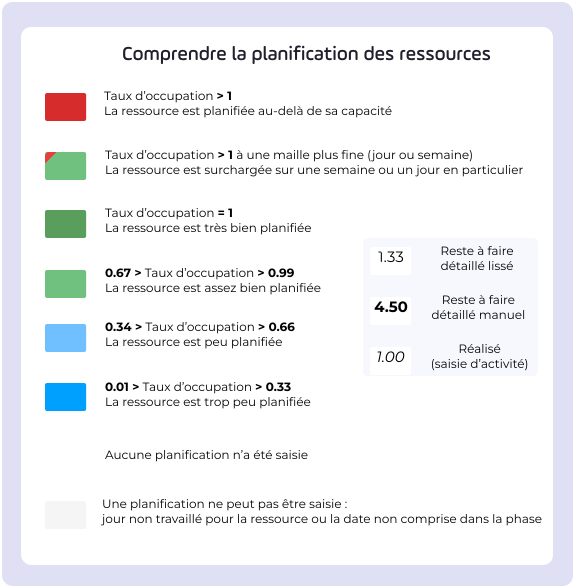
đź’ˇ

Cell colors are not updated until the data is saved.

scheduling : color-coding in the plan

scheduling remaining work

The remaining work be:

  • Automatically smoothed
  • Manually modified over a period of time.

When you hover over the cells, you'll see:

  • The occupancy rate (daily, weekly, or monthly),
  • The completed.
📎

Read more : Representations of the Resources themeRepresentations of the Resources theme

scheduling : color codes in Project > Resources > schedule  remaining work
scheduling : color codes in Project > Resources > schedule remaining work
  • gray: when the dates do not match the duration of the phase before the phase begins phase after the phase ends)
  • white: when no scheduling been entered
  • dark blue: the resource is underutilized: the sum of remaining work completed work completed less than capacity from 0 to 0.33
  • Light blue: The resource is well-scheduled: the sum of remaining work completed work completed less than capacity from 0.33 to 0.66
  • Light green: The resource is very well planned: the sum of remaining work completed work completed its capacity from 0.66 to 0.99
  • dark green: the resource is perfectly scheduled: the sum of remaining work completed work completed its capacity 1
  • Red: The resource is scheduled beyond its capacity the sum of remaining work completed the capacity. The resource is completely unavailable.
  • đź’ˇ

    If the load exceeds the capacity one of the meshes, the cell—which is consolidated to a different mesh—is displayed with a red corner

‣

How do I know whether I have manual or automatic scheduling for my resources and projects?

A font style is applied to each entered cell; these correspond to:

  • default: scheduling or smoothed remaining work (editable)
  • bold: scheduling or remaining work manual remaining work (editable)
  • italics : what has been completed, what has been entered in Activity entriesActivity entries (cannot be edited)
đź’ˇ

Tip: If a cell is in the smoothed remaining work :

  • by entering 0 manually: we want to prevent the entry of " completed
  • by clearing the entry: we want the cell to be re-read
‣

What happens if I want to manually schedule remaining work when my scheduling is automatic?

If data for your project or resource is entered automatically, you can enter additional data manually; it will appear in bold in the table.

When manually entering 1 for a given day, the automatic entries for remaining work RAFDL) for other assignments on that day are set to 0.

When manually entering 0 over the course of a day, so the smoothed (automatic) remaining work cannot be added to it.

‣

What happens if my project switches from manual to progressive scheduling mode?

No data will be deleted: all remaining work entries remaining work scheduling mode will appear in scheduling mode. This will be interpreted as manually entered remaining work : the data appears in bold.

‣

What happens if my project switches from progressive scheduling mode to manual scheduling mode?

No data will be deleted: all entries for remaining work scheduling mode will appear in scheduling mode. Manual remaining work appears in bold, and smoothed remaining work (automatically smoothed according to the period) appears without any special formatting.

‣

What happens if my calendar is displayed in EN-US mode? 🇺🇸

Depending on the calendar settings (EN-US), the first day of the week may vary. For example:

  • in week view, when hovering over a week, the day displayed is Sunday,
  • in daytime display, weeks begin on Sunday
  • in week view, only Sunday can be selected as start date and Saturday as end date

Budget

‣

What is a budget plan ?

  • To prepare a budget or more upcoming fiscal years, or to update it during the fiscal year, you can manage budget plans.
  • You can create multiple budget plans.
  • You can create multiple versions of a plan .
  • A plan applies category a budget category .
‣

What is a budget request ?

  • The budget request the project manager submit funding requests for their project.
  • The budget request you to enter three budget scenarios: low, medium, and high.
  • Only one hypothesis can be validated.
  • A budget request a version of a plan .
‣

What is an envelope ?

  • A envelope to define the total amount of funds allocated to finance projects.
  • A envelope to compare the allocated amount with the amount spent and planned.
  • An envelope associated with a perimeter.
  • A project may use funds budget a envelope falls within the scope ofenvelope.
‣

What is a financial document ?

Financial documents are used to detail the content of entries on a budget line.

Depending on its type, a financial document feeds one of the following representation :

  • The target
  • Theestimated
  • The completed
  • committed for public budgets)
  • Le Invoiced for public budgets)
  • forecast total 1
  • forecast total 2
  • forecast total 3 parts

Financial documents can be imported from third-party software or created manually within the application.

Depending on its status, a financial document may be locked by a user, making it uneditable thereafter.

‣

What's the difference between public and private budget ?

In a budget , we will track:

  • committed A commitmentrefers to the decision to initiate spending using appropriated funds.
  • The Invoiced A payment order, on the other hand, is the administrative act by which a person instructs the accountant to make a payment, providing them with a paymentorderthat includes all supporting documentation for the expense.

In a budget , you’ll track completed items, plannedThis is something each organization needs to decide for itself.

‣

Why can't I link my budget to an analytical axis?

Once an analytical axis has been created, you need to log out and then log back in to the application to associate it with a budget.

You should also verify that the category line is active and linked to a category .

Collaborative

‣

Is it possible to view tasks and exchanges in a dashboard ?

Yes, that's entirely possible; for example, there are blocks such as: Last exchanges createdLast exchanges created, Last modified exchangesLast modified exchanges, List of tasksList of tasks…

To learn how to use your dashboard here: Using the dashboardUsing the dashboard

‣

Why can't I see all the tasks in my table?

There are several possible reasons:

  • You don't have permission to view all tasks.
  • There is a filter applied to the task list (completed tasks, tasks not assigned to you, etc.). Click the "X" next to a filter criterion to view all tasks.
  • The list is paginated: scroll to the bottom of the screen to view the rest of the tasks by switching pages.
‣

Why can't I add a document ?

There are several possible reasons:

  • The document the maximum allowed size (500 MB by default)
  • The file type is not accepted

Report

‣

Why can't I modify the properties of a Datatalk I've already created?

Only the creator of the Datatalk record can modify its properties.

‣

Why can't I see the themesbudget, resource or indicator) in Datatalk?

There are several possible reasons:

  • You do not have the necessary permissions. Please contact your administrator.
  • The theme enabled for your platform. Feel free to ask your administrator, and if you are an administrator, your Virage manager .
‣

What do the colors in the Resource availability Review mean?

Availability review allows you to display, using a color code, the availability resources according to their assignments and according to a period.

Here are the colors displayed and what they correspond to in detail:

  • Invalid availability
image
  • Availability 100%
image
  • Availability 90%
image
  • Availability 80%
image
  • Availability 70%
image
  • Availability 60%
image
  • Availability 50%
image
  • Availability 40%
image
  • Availability 30%
image
  • Availability 20%
image
  • Availability 10%
image
  • Availability 0%
image
  • Availability exceeded
image

Summary sheets

‣

Why aren't the images displayed correctly in my PowerPoint file?
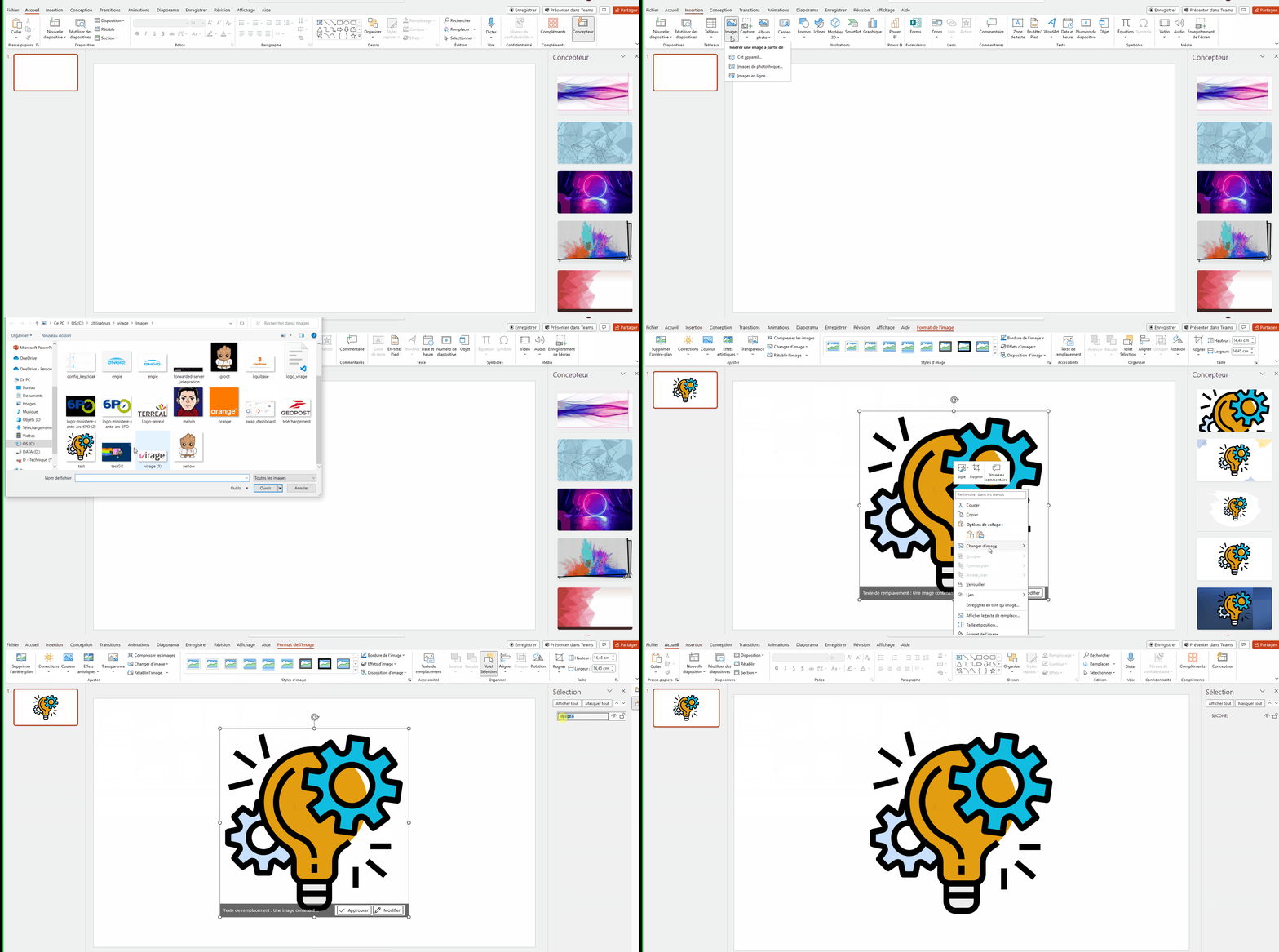
If the images aren't displaying properly (e.g., Gantt chart), try deleting the images from the slide master (View → Slide Master).

Otherwise, check the names of the images used as templates—the images must be different and have different names.

The syntax checker may prevent attributes from being passed up the chain. If an attribute underlined in red, right-click → Ignore, and it should work.

risk

‣

How is the criticality of a risk calculated in my cockpit ?

Criticality is calculated based on the probability and severity of the risk.

This criticality is displayed in cockpit (consolidated): we therefore sum the criticality of each risk .

Example:

My project has three risks

Gravity (input)
Probability (entry)
Criticality (calculated)
Criticality value (calculated)
Maximum criticality value (if maximum probability)
risk
Average
Very important
Important
10
10
risk
Very important
Low
Average
5
20
risk
Very low
Very low
Very low
1
3
Total
/
/
/
16
33

The criticality-to-maximum criticality ratio for this project is 16 to 33, so the figure in the cockpit will be 48%.

When viewing therisk cockpit for multiple projects, each risk must be added together in the same way.

Gravity
Probability
Criticality
Value
Very low
Very low
Very low
1
Very low
Low
Very low
1
Very low
Average
Very low
1
Very low
Important
Low
3
Very low
Very important
Low
3
Very low
Default
Low
3
Low
Very low
Very low
1
Low
Low
Very low
1
Low
Average
Low
3
Low
Important
Low
3
Low
Very important
Average
5
Low
Default
Average
5
Average
Very low
Very low
1
Average
Low
Low
3
Average
Average
Average
5
Average
Important
Average
5
Average
Very important
Important
10
Average
Default
Important
10
Important
Very low
Low
3
Important
Low
Average
5
Important
Average
Average
5
Important
Important
Important
10
Important
Very important
Important
10
Important
Default
Important
10
Very important
Very low
Average
5
Very important
Low
Average
5
Very important
Average
Important
10
Very important
Important
Important
10
Very important
Very important
Review
20
Very important
Default
Review
20

Administration

‣

Why do I see "technical.user" in my user list?

This technical user ensures that the automation systems operate properly on Project MonitorProject Monitor. It is important not to modify it.

‣

What happens if I forget to create a technical user for the processes?

It will not be possible to run processes on Project MonitorProject Monitor if there is no technical user for the processes

If there is no technical user assigned to the processes, a message will appear on the cards WorkflowsWorkflows and AutomationsAutomations

image
‣

What do I do if I make a mistake?

The first thing to do when an error occurs during the execution of a process is to check the platform's logs

‣

I've created a technical user for the processes, I've tested my payload in a RestClient yet my process falls into error in Project MonitorProject Monitor. What could be the reasons?

You must ensure that the technical user for the processes has the appropriate permissions in a role in Project MonitorProject Monitor to perform the actions specified in Camunda files (creating task, applying template, modifying attributesattribute)

It is also possible that the API calls in the header are missing the technical user ID for the processes (X-PM-API-ID) as well as the user's password (X-PM-API-PASSWORD)

‣

How can I check that the Galilee datamart has been updated?

There are two Galilee to check for updates to Galilee :

Through the interface of Project MonitorProject Monitor

  1. Click on AdministrationAdministration > Advanced settings > Technical configuration > GalileeGalilee.
  2. At the top of the screen, check the date and time of the last time GaliléeeUpgrade was run. You will also see whether the run was successful or failed.

Through the database

  1. Access the target database, which is fed by the Galilee data mart.
  2. Query the table Update with the field date of visit, which shows the date and time of the last time Galilee was run.
📎

For further information: Galilee  memo (Datamart)Galilee memo (Datamart)